
Lets first look at how to write a basic java program. We shall do this on command line so as to better understand the overall semantics of a java program.
Lets follow the following steps to write our first Java program :
- Create a file named WelcomeToJava.java
- Inside this file first declare a package statement as follows :
- package org.java;
- Next declare a Java class having the same name as that of the file.
- public class WelcomeToJava
- Next declare a method with exact same words :
- public static void main(String args[])
Below is the complete program with a body in the above method and we are done writing our first java program.
WelcomeToJava.java
package org.java;
public class WelcomeToJava{
public static void main(String args[]){
System.out.println(“Welcome to Java !!”);
}
}
Now lets break open this code and understand what is what.
1. The first line of a java program opens up with a package declaration. In our case it says
package org.java .
Explanation : Make java class unique & distinguishable.
Reason : We all live in our houses in one or the other street. Imagine my house number is 101 in ABC street & my friend’s house number is also 101 in XYZ street.If a person asks my & my friends house number and if we tell him its 101 then he would be utterly confused. Why ?? because both of us have the same house number. So how shall we distinguish these both house numbers ? By stating the full address along with street name i.e. 101 ABC street & 101 XYZ street. This way the person would be able to clearly distinguish between the two addresses.
Same story goes with package name. It might be the case where two java classes might have the same name which again will cause us confusion while using them. But if we specify the package name then we shall be able to know which class is which. Its like a fully classified name. Other examples could include our fully classified name, which includes our first name , middle name & last name. There may be many people named Salil but adding Misra to my name makes it unique and distinguishable from other people who have the name Salil.
2. One public class per file and that class should have same name as that of file.
3. Next we have a method with full signature as
public static void main(String args[])
There has to be some point in a program from where the execution of the program must begin.This method serves as an entry point in any java program. The name of this method is main and it returns nothing since the declaration says its return type to be void.
Just like in a car there is an engine which runs the car, but in order for car to perform all its operations you need to first start the car through the ignition key and once started we can take the car anywhere possible. Similarly this method serves as starting point in any java program and it is from here that further execution start be it running a web application or a desktop application.
4. Command Line Arguments
Another point to note here is the arguments to the main method. As an example of
car,when we start the car we have option of switching the engine to CNG or petrol based on our initial input. The car adjusts accordingly as per our initial input and switches to appropriate engine type and thereafter runs on that engine type. Similar to this concept is the concept of program arguments. While running a program we can pass arguments to our program , which the program can retrieve from inside and then use it accordingly.
Now about running the program. The java class we discussed above cannot be executed directly . Executing a java program is a two-step process. In order to execute a java program i.e. .java file we first need to compile the program. Once compiled we get a .class file which is referred to as in java vocabulary as a Bytecode of the compiled java program.This bytecode or .class file is then further executed to obtain the output of the program.
In order to compile above program , follow the following steps :
- Open a command prompt and navigate to the directory where the java program resides.
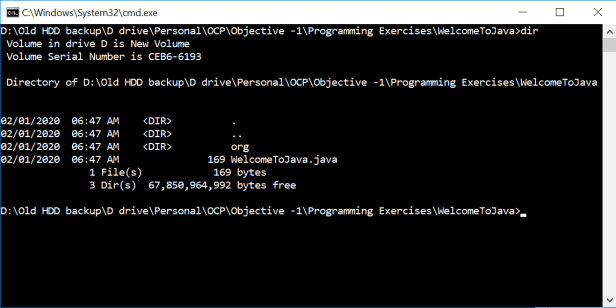
- Next we shall compile the program. Java comes with a compiler program named javac. This can be used to compile a java program. The usual command to compile the program is as follows :
javac WelcomToJava.java
If at this point of time we look at the directory containing the .java file , we shall see a WelcomeToJava.class file.
- Next we run the above .class file using the following command :
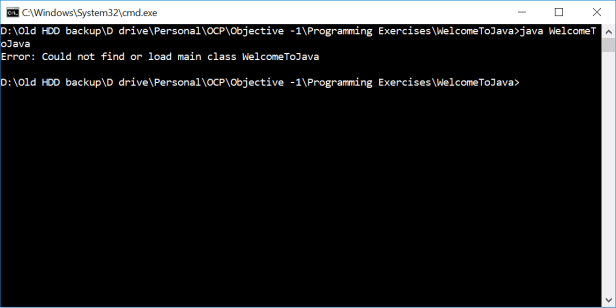
java WelcomeToJava
- When this file is run following error would occur :
- Compilation parameters
The reason for the above problem is that as we discussed that packages in java reflect the fully qualified name of a class and java expects that class to exist on disk with its fully qualified name. This essentially means that there should be a directory structure backing the java package name on the disk.So in our case thee should have been a directory structure org/java and the compiled class should have been present there. While compiling a java program java provides with lots of command line parameter the can be combined with actual command to give additional instructions to the java compilation program. In our case a special parameter exist i.e. -d which directs java compiler that on successful compilation of the java program create a directory structure with the compiled .class file residing within it. The exact location where to create the directory structure corresponding to package declaration can passed along with -d option. If however we pass a dot “.” after -d option it means to refer to the current directory and hence the directory structure shall be created in the current working directory. We shall see this with an example.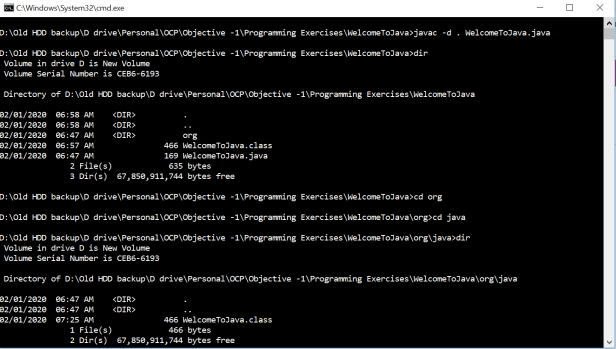
- As we can see from the figure above, we compiled using the following command :
javac -d . WelcomeToJava.java
As visible from the figure this generates WelcomeToJava.class file inside org/java directory. In case if we wanted to create this directory structure in some other directory instead of the current directory then we could have given that path after -d option. For ex. suppose we wanted the path to be D:/code , then the command would have looked like following :
javac -d D:/code WelcomeToJava.java
- Now about running the above program. As we have seen that recognizes the class by its fully qualified name i.e. <packagename>.<classname> and also requires that fully classified name exist not just logically but physically via directory structure.Hence in order to run the above compiled code we shall use the java command and pass the fully qualified name of the class . Following is the command that we use :
java org.java.WelcomeToJava
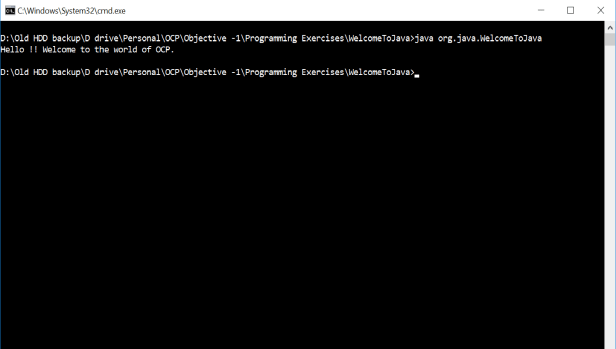
The program executed and prints some text to the console.
- This was a full anatomy of running a java program. Drop in your queries in the comments below , would be happy to answer them.
 codeSimplfied