
A computer is a device that understands the language of 0 & 1 i.e. binary. We humans on the other hand have our own set of languages for communication. In order to bridge the gap between a computer and human , programming languages were invented. A Programming language allows humans to express the operations that they want to perform in terms of a human readable format.
Java is one such language that we are going to learn in this course.
But first lets quickly go through the installation steps.
Step 1. Download Java SE Development Kit 11 from this link.
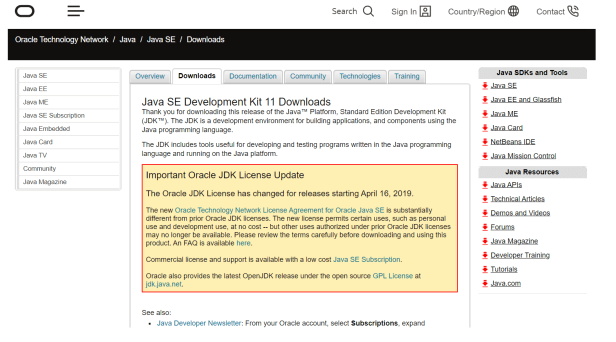
Step 2. Install Java 11 using the downloaded installer.While installing , the installer asks for a location to install Java 11. Note down that location.
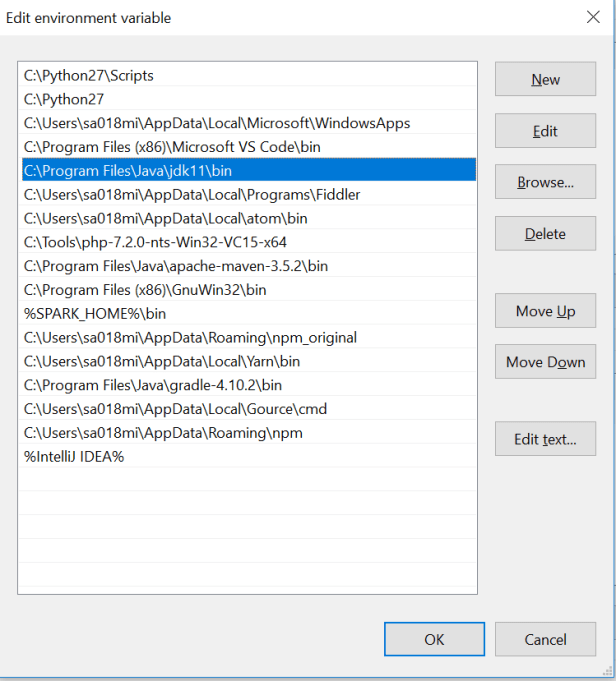
Step 3. When installation completes , go to the location where installation happened. Inside the installation directory copy the path till <java 11 installation path >/bin.
Assuming that we are working on windows environment, go to environment variables and add/update the variable path and add the path that we copied in previous step.
In order to test the java installation open a command prompt and type java, we should be able to see the following on the terminal :
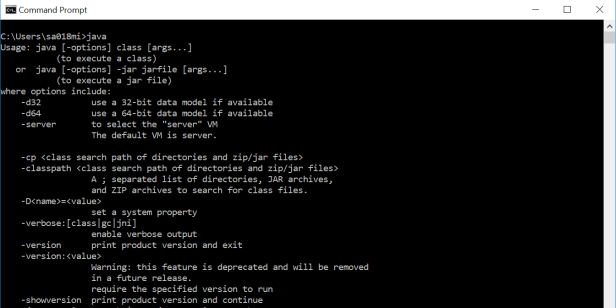
This makes us all ready to dive into Java development.
Next we are going to understand about some of the important features of java language.
- Write Once , Run Anywhere
Every programming languages have their own rules of writing and expressing the operation.But then when it comes to a computer , it is completely unable to understand the programming language. Here is where the role of compiler comes in. A compiler is a program that takes the code written in human readable format and converts it to a machine readable format. Java comes with a compiler that compiles the code written in Java language to java compliant format referred to as “bytecode”.This byte code is still not machine readable format but it gives the power of platform independent code. This means we can write a java program and make it run on any platform. Generally for people who are from C background , know the importance of this feature as for C language the compiler generates a machine readable code which is tied to that specific platform/processor. On the other hand java is completely platform independent and code once compiled can be run on any platform. This feature of java is referred to as
“Write Once Run Anywhere”. This is made possible because java comes with a compiler and a program executor referred to as Java Virtual machine (JVM).
Complete process of running a Java program involves compiling the java language code and generating a .class bytecode file and then running it with JVM process to actually execute the code. - Object Oriented Programming (OOP)
Java is an object oriented programming. But what is Object oriented programming ? Lets understand.
Object oriented technique is modeled on the real world that we see all around. Take an example of car . A car represents a “class” meaning , it represent certain basic attributes and behavior. A car “class” can have attributes such as a steering , 4 wheels and a horn. Behavior of car “class” can be like start the car , steer left/right, blow horn. So “class” is defined in terms of its attributes and behavior. A class defines a structure. On the other hand “objects” are an actual, real time representation of a “class”. For example , an “object” of a car “class” could be “Ferrari GTC4” , which is an actual car with visible attributes like steering , 4 wheels etc. Similar to this example we can model most of the things that we see in our daily lives. Java lets you define a class with attribute and behaviors and then later we can create objects of that class. Some other OOP concepts include Inheritance, Polymorphism etc.. We shall discuss more of this when we dive deeper. - Memory Management
Java provides automatic garbage collection facility. A Java programmer need not worry about cleaning memory . The memory manager component of java is called as garbage collection. The garbage collector automatically executes in the back end and keeps a close look at the memory and time-to-time keeps cleaning up the memory. A programmer does not have exact control on when to call a garbage collector but he can give suggestions to run a garbage collector. We shall learn more on this in coming chapters. - Java Virtual Machine(JVM),Java Runtime Environment (JRE) & Java Development Kit(JDK)
Java virtual machine is the component of java which is actually responsible for executing the compiled bytecode of a java program. Java installation comes in two flavors, a Java Runtime Environment (JRE) & Java Development Kit (JDK). The JRE is purely only for running the compiled java program and does not contains tools to compile a java program. On the other hand JDK is a complete package with both compilation as well execution facility. The one we installed above was a typical JDK installation. - Java Specification
Java language specification is a document that defines essential parts of a java language implementation.It defines all necessary grammar rules and syntax for java language.Actual implementation of this the java language itself. Similarly there is a java virtual machine specification and JVM is a reference implementation for it also commonly referred to as Hotspot VM.
Having understood some basic features of JAVA , we are now ready to start writing a basic java program and run it.
Some important links to refer :
Java Language specification
Java community process
Home page
Java Getting started
 codeSimplfied