
A package manager is a piece of software that manages the project dependencies.A package manager keeps a list of software/dependency which it maintains.
In order to better understand what a package manager is ,lets consider the scenario where there is no package manager at all. So lets say we have this social media application that allows users to share real time updates. This application makes use of a server at the back end. So in order to process the requests coming from the browser server makes use many software. Some for logging, some for database access, some for general utilities, some might be special purpose and some other might be just the required dependencies of our . Once our developer friend start writing code, gradually step by step he finds needs for different dependencies and he tries to download them from one source to another, trying to figure out the version of the dependency that best matches his requirement. This seems a tedious task manually searching the dependency and downloading it. This is where the dependency management tools come in handy. Using these tools you can specify all your required dependencies at a common place and then it is the responsibility of dependency management software to manage and download all the declared dependencies.Another piece of software that is made use of in dependency management is the repository from where the dependency manager downloads the dependencies.The repository along with the dependency manager together forms the core of the dependency management piece.
One such tool that we make use of in the Node.js ecosystem is Node Package Manager or npm as it is popularly known.
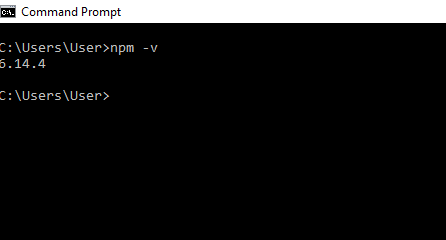
When we downloaded Node.js, npm automatically gets installed. In order to verify whether npm is installed, type following on the command prompt :
npm -v
On my system this prints:
NPM also has its own repository that is referred to as NPM registry and is available at the following URL :
NPM registry contains various modules which anyone can leverage to build their own applications. If I want to use these modules, then I would basically create a file named, package.json and in that under the dependencies key would declare my dependencies. Following is an example of a basic package.json :
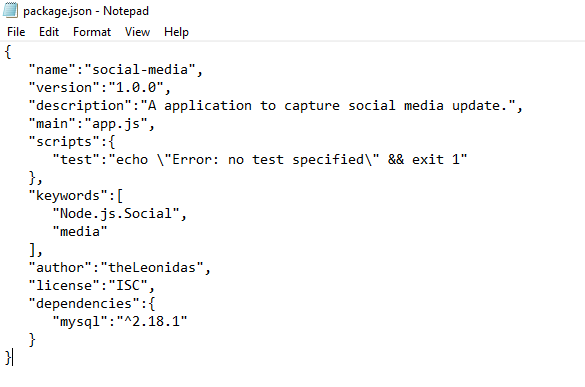
Here I have used mysql as a module for my project. Alternatively, I instead of declaring the dependency, make use of npm install command.
If instead of just writing npm install we write npm install –save command, then 2 things happen :
Dependency is downloaded
An entry for the dependency is made under the dependencies key in the package.json.
Next I shall discuss, how to get get started with npm and build our first project.
 codeSimplfied